> ## Documentation Index
> Fetch the complete documentation index at: https://checkly-422f444a-mda-troubleshooting-section.mintlify.site/llms.txt
> Use this file to discover all available pages before exploring further.
# TCP Monitors Overview
> Monitor the availability and performance of your TCP services by establishing connections and verifying responses.
**Monitoring as Code**: Learn more about the [TCP Monitor Construct](/constructs/tcp-monitor).
## What are TCP Monitors?
TCP monitors perform low-level connectivity checks by establishing TCP connections to your services. They verify that your services are listening on the expected ports and can accept connections, making them essential for monitoring infrastructure components and backend services.
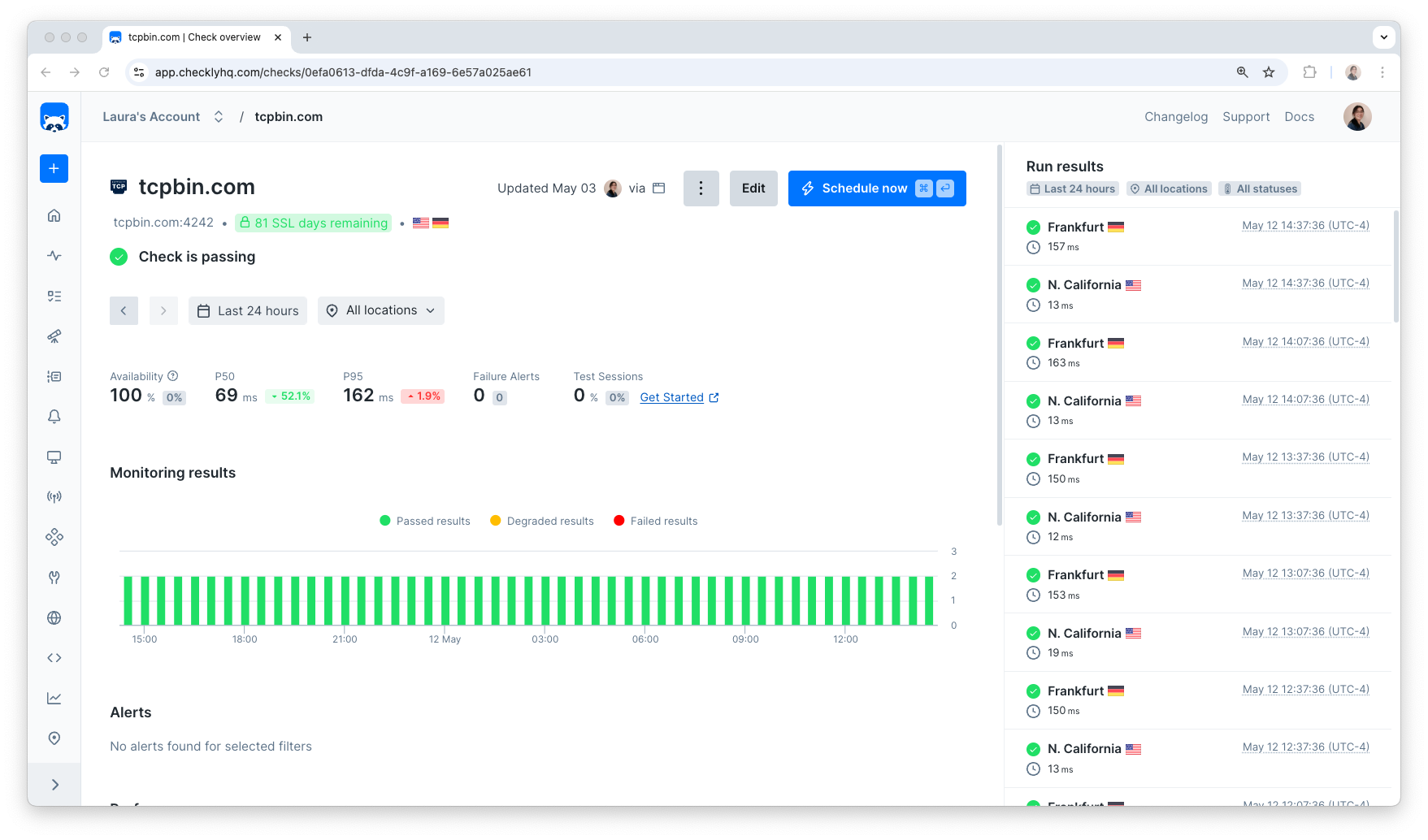 **TCP Monitors are perfect for detecting downtime and performance issues in:**
* Database servers (MySQL, PostgreSQL, MongoDB)
* Mail servers (SMTP, IMAP, POP3)
* Custom TCP services and APIs
* Load balancers and proxies
* SSH and FTP servers
* Redis and Memcached instances
## How TCP Monitoring Works
TCP monitors perform connection-level checks:
1. **Connection Attempt** - Establishes a TCP connection to your service
2. **Port Verification** - Confirms the service is listening on the specified port
3. **Response Validation** - Optionally validates service responses
4. **SSL/TLS Check** - Verifies certificate validity for secure connections
5. **Timing Measurement** - Records connection and response times
TCP monitors are ideal for monitoring services that don't expose HTTP endpoints but need connectivity verification.
## SSL/TLS Certificate Monitoring
For services using SSL/TLS, TCP monitors automatically check:
* **Certificate Validity**: Ensures certificates are not expired
* **Chain Validation**: Verifies the complete certificate chain
* **Expiration Warnings**: Alerts before certificates expire
* **Protocol Compliance**: Checks for secure protocol versions
Certificate monitoring is only available when using SSL/TLS protocol options.
## Troubleshooting Common Issues
**Symptom**: Monitor shows "Connection refused" errors
**Causes**:
* Service is not running
* Port is blocked by firewall
* Incorrect host/port configuration
**Solutions**:
1. Verify service is running: `netstat -tlnp | grep :3306`
2. Check firewall rules
3. Test connectivity: `telnet hostname port`
**Symptom**: Monitor times out without connecting
**Causes**:
* Network latency or packet loss
* Service overloaded
* Timeout set too low
**Solutions**:
1. Increase connection timeout
2. Check network connectivity
3. Monitor service performance
**Symptom**: SSL validation failures
**Causes**:
* Certificate expired
* Hostname mismatch
* Invalid certificate chain
**Solutions**:
1. Check certificate validity: `openssl s_client -connect hostname:port`
2. Verify certificate expiration dates
3. Update certificates before expiration
**TCP Monitors are perfect for detecting downtime and performance issues in:**
* Database servers (MySQL, PostgreSQL, MongoDB)
* Mail servers (SMTP, IMAP, POP3)
* Custom TCP services and APIs
* Load balancers and proxies
* SSH and FTP servers
* Redis and Memcached instances
## How TCP Monitoring Works
TCP monitors perform connection-level checks:
1. **Connection Attempt** - Establishes a TCP connection to your service
2. **Port Verification** - Confirms the service is listening on the specified port
3. **Response Validation** - Optionally validates service responses
4. **SSL/TLS Check** - Verifies certificate validity for secure connections
5. **Timing Measurement** - Records connection and response times
TCP monitors are ideal for monitoring services that don't expose HTTP endpoints but need connectivity verification.
## SSL/TLS Certificate Monitoring
For services using SSL/TLS, TCP monitors automatically check:
* **Certificate Validity**: Ensures certificates are not expired
* **Chain Validation**: Verifies the complete certificate chain
* **Expiration Warnings**: Alerts before certificates expire
* **Protocol Compliance**: Checks for secure protocol versions
Certificate monitoring is only available when using SSL/TLS protocol options.
## Troubleshooting Common Issues
**Symptom**: Monitor shows "Connection refused" errors
**Causes**:
* Service is not running
* Port is blocked by firewall
* Incorrect host/port configuration
**Solutions**:
1. Verify service is running: `netstat -tlnp | grep :3306`
2. Check firewall rules
3. Test connectivity: `telnet hostname port`
**Symptom**: Monitor times out without connecting
**Causes**:
* Network latency or packet loss
* Service overloaded
* Timeout set too low
**Solutions**:
1. Increase connection timeout
2. Check network connectivity
3. Monitor service performance
**Symptom**: SSL validation failures
**Causes**:
* Certificate expired
* Hostname mismatch
* Invalid certificate chain
**Solutions**:
1. Check certificate validity: `openssl s_client -connect hostname:port`
2. Verify certificate expiration dates
3. Update certificates before expiration